AR Sketch : Sketch & Trace
- 3.9
- Rating
- 500.00K
- Installs
- Free
- Price
 Analysis by App-foxy
I tried AR Sketch: Sketch & Trace as a quick way to turn ordinary photos into drawing references, and I found its appeal almost immediately: it reduces the intimidating first step of sketching. Instead of staring at a blank page, I could work from an image, follow visible outlines, and experiment with an anime or cartoon-like result. It sits in the Art & Design category, but it feels less like a full drawing studio and more like a guided bridge between a phone camera and a sheet of paper.
That distinction matters. If you want layers, advanced brushes, detailed color correction, or a serious illustration workspace, this is not the app I would choose first. If you want to make a casual drawing with a child, copy a simple pose, prepare a handmade card, or explore how a portrait changes when its lines are simplified, it has a much clearer purpose. I would describe it as a practical tracing companion rather than a replacement for a professional art app.
How it works when several people share the same phone
The most enjoyable use I found was a shared-device session. One person chooses a photo, another decides whether the subject should look more like an anime drawing or a cartoon sketch, and the artist works from the displayed image. That simple division makes the app useful in a household where not everyone has their own tablet or drawing setup. It gives the activity a natural starting point without requiring everyone to understand digital illustration tools.
You May Also Like

 Blood Strike: 2.5 Anniversary
Blood Strike’s Loadouts Turn Every Drop Into a Tactical Gamble
A close look at Blood Strike’s custom loadouts: how fast access to signature weapons reshapes its battle royale rhythm, rewards preparation, and narrows the gap between fights.

 Pandora - Music & Podcasts
Pandora’s Music Is Easy to Start, but Harder to Recover
Pandora’s strength is its low-effort path from a seed to a station. Its weak spot is how much confidence it asks you to place in connection, setup, and quiet recovery.

 8 Ball Pool
8 Ball Pool Is Built on Rivalries, Rematches, and Routine
A close look at the rivalries, rematches, shared routines, and unanswered safety questions that turn a quick pool match into a persistent mobile community.

 Samsung Music
Samsung Music’s Quiet Strength Is Playing What You Already Own
Its reach comes less from spectacle than from dependable access to a personal library. That simplicity is both the app’s strongest retention engine and its ceiling.

 AccuWeather: Weather Radar
AccuWeather Review: A Quick, Clear Forecast for Everyday Decisions
For everyday plans, the best forecast is the one you can understand quickly. AccuWeather makes rain timing, radar, and local conditions easy to act on, with a few trade-offs.

 Hill Climb Racing
Why Hill Climb Racing Still Turns Crashes Into One More Run
A tiny car, a bumpy hill and one more upgrade: Hill Climb Racing keeps resurfacing because its simple chaos makes every near-miss feel personal.
More From Our News Desk



A realistic example would be a weekend afternoon when someone wants to draw the family pet. The person holding the phone can select a clear photo, while the person drawing adjusts the paper or surface until the projected reference is comfortable to follow. A younger artist may focus on the outer shape first, while an older sibling adds eyes, hair, clothing details, or background elements by hand. The app does not need to do all the creative work for the activity to be worthwhile; its value is in helping people begin together.
I also like the possibility of using it for small, personal projects rather than polished artwork. A photo of a friend can become a birthday-card reference. A holiday snapshot can become a simple line drawing. A favorite character pose can help someone practice proportions. These uses are more convincing than the idea of pressing a button and expecting a finished illustration, because the final result still depends on the person drawing.
On a shared phone, coordination is important. I would decide in advance which image to use and keep the original photo available before handing the device to another person. That avoids the familiar household problem of someone changing the selected image while another person is already preparing the paper. Since the app is built around tracing and transforming visual references, a few minutes of preparation can make the session much smoother.
What the tracing approach gets right
The main strength is accessibility. A blank page asks the artist to solve composition, proportion, and subject choice at the same time. A tracing workflow separates those problems. I can concentrate on line control and interpretation instead of wondering whether the entire pose is wrong. For a beginner, that reduction in pressure is meaningful.
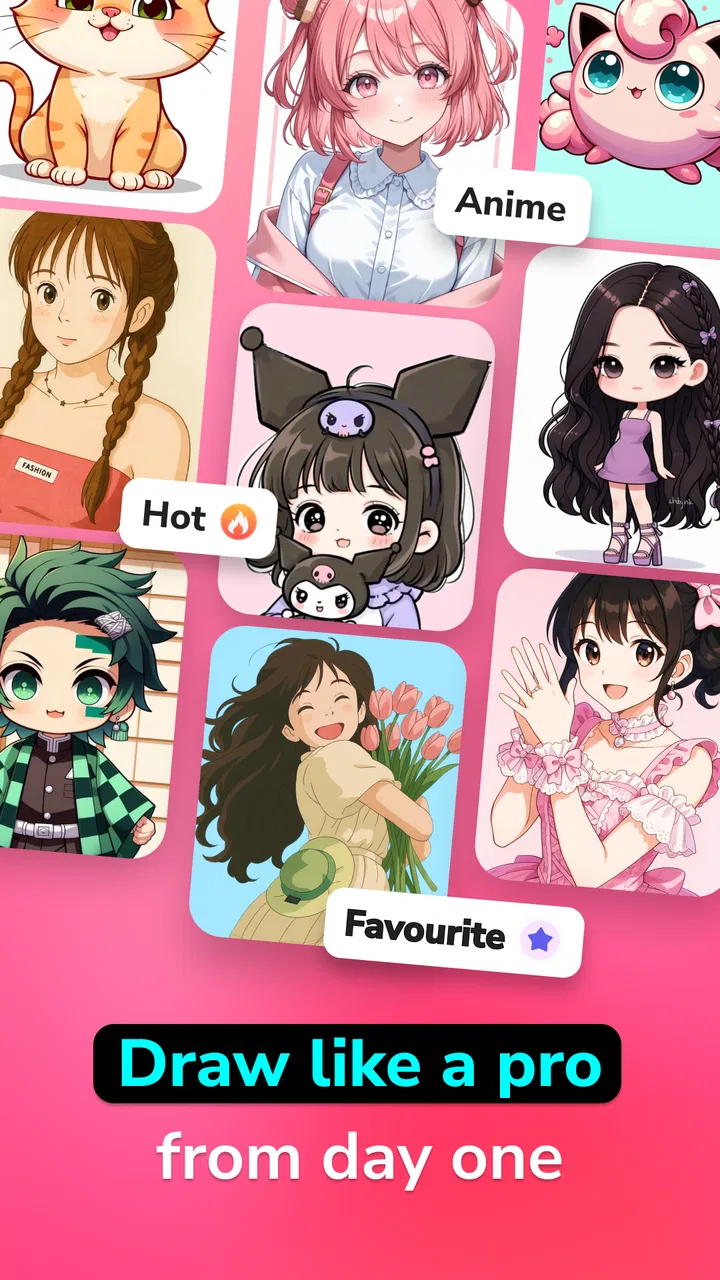
The anime and cartoon direction also gives the process a recognizable visual goal. A regular photo can contain too much information: fabric texture, messy backgrounds, shadows, and small objects competing for attention. A simplified sketch reference encourages me to look for the features that actually define the subject. With a face, that may be the hair outline and eye placement. With a pet, it may be the ear shape, body position, and tail.
One useful technique is to choose photos with strong separation between the subject and its background. A full-body image against a busy room is harder to interpret than a clear pose with open space around it. This is not a limitation I blame entirely on the app; it is a basic truth of tracing. Still, the app rewards better photo selection more than casual users may expect.
Another practical insight is to begin with a less complicated subject. A single object, a simple portrait, or a pet sitting still gives a new artist a better first experience than a group photo with overlapping bodies. Once the user understands how the reference behaves, more complex images become easier to judge. In my experience, choosing the right source image has more impact than trying to force an unsuitable photo through the workflow.
Setup boundaries on a household device
Before using it with other people, I would set a clear boundary around the phone itself. The app is free to install, which makes it easy to try, but it also includes in-app purchases priced from $6.99 to $11.99 per item. That is not a reason to avoid it, yet it is a reason for the device owner to handle purchase decisions rather than leaving them ambiguous during a group activity.
I would also explain that “free” does not necessarily mean every part of the experience is equally open. A child or guest may reasonably assume that tapping a prominent option is harmless, while the account holder may see a purchase prompt differently. The safest household habit is simple: the person responsible for the phone makes the final decision whenever an upgrade or paid item appears.
The app is marked for Everyone, so it is broadly suitable for a general audience from an age-rating perspective. That does not remove the need for adult judgement when children are using a shared device. The important questions are practical ones: whose photos are being selected, who is holding the phone, and who is allowed to approve spending? Those boundaries are more useful than assuming that an all-ages label automatically settles every household concern.
I would keep the first session supervised, especially if the phone contains personal photographs. Letting a child choose from a prepared folder or a small selection of suitable images is more comfortable than handing over the entire gallery. This is not a special feature of the app; it is a sensible way to protect privacy and avoid accidental use of an image that another family member did not intend to share.
The minimum operating requirement is Android 7.0, so owners of older Android phones should check compatibility before planning a group activity. On a supported device, I would still test the setup alone first. The goal is not to discover an operating-system issue or an unexpected purchase screen after everyone has gathered around the table.
Coordinating the creative session
AR tools are most useful when the phone can stay in a stable position while the artist works. I found that a wobbly setup quickly becomes frustrating because the reference shifts while the hand is trying to follow it. A stand, a stack of books, or another secure arrangement can help, provided it does not cover the camera or make the phone likely to slide. The exact arrangement depends on the household, but stability should be treated as part of the drawing process.
Lighting deserves attention too. A dark room may make the screen difficult to follow, while harsh reflections can hide important lines. I prefer even light on the paper and a screen angle that remains readable without forcing the artist to lean over it. This small adjustment is one of the less obvious ways to improve the experience; the app can provide a reference, but it cannot fix glare or an uncomfortable drawing position.
For a group, I would use turns instead of trying to draw over one another. One person can choose the image, another can prepare the paper, and a third can add details after the main outline is finished. This keeps the process social without turning the phone into a tug-of-war. It also makes the activity suitable for mixed skill levels: a beginner can trace the large shapes, while a more confident artist can refine the result.
A useful household workflow is to agree on the purpose before starting. Are you trying to make a finished card, practice faces, or simply compare several cartoon treatments of the same photo? The answer changes how much time you should spend on setup. For casual experimentation, speed is part of the fun. For a keepsake, it is worth taking more care with the source image, paper, lighting, and outline.
I would not expect the same reference to work equally well for every artist. Someone who prefers loose, expressive drawing may find the guided lines restrictive, while a beginner may appreciate that structure. In a shared session, allowing each person to interpret the reference differently is better than treating the app’s result as the only correct version. The strongest outcome is often the drawing that departs from the reference in an interesting way.
Age, trust, and the role of the account owner
The Everyone rating makes this an approachable choice for a household activity, but trust still needs to be handled deliberately. The app can work with personal photos, and a shared phone may contain images that should not be opened, edited, or selected casually. I would prepare the image before passing the device around and make it clear that browsing beyond that choice is not part of the activity.
This is especially relevant when several relatives use one phone. A younger user may only want to draw, while the owner may be concerned about accidental changes, purchases, or sharing. A short explanation at the beginning avoids awkward corrections later: use the chosen image, ask before tapping unfamiliar buttons, and return the phone when the drawing session ends.
The developer is NowTech - Halo Group, and the app has reached over 500 thousand installs with an average rating of 3.9 from more than 900 ratings. Those figures suggest that it has found a real audience, but I would not treat popularity as proof that it will suit every household. The rating is respectable rather than exceptional, which matches my impression: the idea is appealing and accessible, while the experience depends heavily on expectations, source photos, and how carefully the session is arranged.
Its current version is 1.1.4, and I would keep the app updated through the normal store process rather than relying on an old installation for a long-term family project. Updates can matter when an app depends on camera behavior and device compatibility, even though the drawing quality will still depend primarily on the chosen image and the person using the reference.
One trust-related trade-off is that the app is better for guided creation than private, independent art practice on a shared phone. If a teenager wants a personal illustration workspace with full control over files and tools, a dedicated drawing app may be a better fit. If the goal is a supervised, low-pressure activity where someone can start from a photo, this app makes more sense.
Where it differs from ordinary drawing apps
Compared with a conventional sketching app, AR Sketch: Sketch & Trace begins with the real-world drawing surface and a visual reference. A standard digital canvas is usually better for undoing mistakes, managing layers, coloring neatly, and saving a polished composition without paper. This app’s advantage is immediacy: I can use a phone and physical materials to turn a picture into a hands-on activity.
Compared with manual tracing from a printed photograph, it removes the need to print the reference first. That can save preparation time and makes it easy to try another image. The trade-off is that the phone has to remain positioned and visible while drawing. Printed paper is less dependent on battery, screen brightness, reflections, or a stable stand, so traditional tracing remains preferable for long sessions or classroom-style activities.
It also differs from automatic photo-filter apps. A filter can produce a stylized image for viewing or sharing, but it does not necessarily help me reproduce the subject with my own hand. Here, the creative result is partly mine because I still have to interpret the lines, choose what to emphasize, and decide when the drawing is finished. That makes it more rewarding for practice, but less convenient if I only want an instant finished image.
For professional illustrators, the limitations are clear. I would choose a full-featured art application when I need precise editing, multiple layers, custom brushes, typography, or repeatable production work. For a beginner, hobbyist, parent, or friend looking for a quick drawing prompt, those advanced tools may be unnecessary. The right choice depends less on whether one app is “better” and more on whether the user wants a guided physical sketch or a complete digital workflow.
Who should use it and who should skip it
I would recommend it to someone who says, “I want to draw, but I do not know where to start.” It is also a good candidate for a family art table, a casual creative break, or a person who wants to turn favorite photos into handmade references. The anime and cartoon focus gives the activity a playful direction without demanding that the user already understand illustration theory.
I would be more cautious recommending it to someone who dislikes tracing or wants every mark to come directly from imagination. That user may feel that the reference controls too much of the process. I would also steer away from it for anyone seeking a serious digital production tool, because the app’s central appeal is the assisted sketching experience rather than deep editing.
People should also be realistic about the result. A weak photo will not automatically become an excellent drawing guide, and a complicated scene may remain difficult even after transformation. My best results came from treating the app as a starting point: simplify the subject mentally, trace the major shapes, then add personal choices instead of copying every visible detail.
My household verdict
AR Sketch: Sketch & Trace works best when I use it as a shared creative prompt, not as a magic art generator. Its free entry point, broad age rating, and simple photo-based idea make it approachable, while the paid items mean the account owner should stay involved in purchase decisions. I would prepare images, stabilize the phone, manage turns, and keep personal gallery boundaries clear before inviting children or guests to use it.
For a family that wants a low-pressure drawing activity, I can see the appeal. It gives beginners something concrete to follow and gives more experienced artists a base they can reinterpret. The strongest hidden benefit is not the stylized output itself; it is the way the app creates a shared starting point for people with different confidence levels.
My final recommendation is therefore specific: try it if you want to trace photos into anime or cartoon-inspired sketches on paper and are happy to guide the process. Skip it if you need a complete digital art studio, private account separation, or a polished result with almost no manual work. Used within those boundaries, it is a friendly and practical addition to a household art session, especially when the goal is to make something together rather than chase professional finish.
FAQs for AR Sketch : Sketch & Trace
01What is AR Sketch: Sketch & Trace, and how does it work?
AR Sketch: Sketch & Trace is a drawing assistant that uses augmented reality to place a virtual reference image over your real-world view. After selecting or importing an image, you can see its outlines through your phone’s camera and draw them on paper. The app is designed to help beginners practice proportions, shapes, and tracing rather than automatically create a finished drawing for you.
02Do I need special equipment to use AR Sketch: Sketch & Trace?
You generally do not need professional equipment to get started. A compatible Android or iPhone, a sheet of paper, and a steady surface are usually enough. For better results, a phone stand, tripod, or adjustable holder is highly recommended because keeping the camera fixed makes the projected reference easier to follow. Good lighting also helps the camera view remain clear while you sketch.
03Can I use my own photos or images in the app?
The app is intended to work with reference images, and depending on the version and platform, you may be able to choose artwork from a built-in collection, your device gallery, or the camera. Imported images may need cropping, resizing, or adjustment before tracing. Users should also make sure they have permission to use copyrighted images, especially if the finished drawing will be published or sold.
04Is AR Sketch: Sketch & Trace free to download and use?
Availability and pricing can vary between the Android and iOS versions, so it is important to check the current store listing before downloading. The app may offer free basic tools while placing advanced content, image options, or an ad-free experience behind in-app purchases or a subscription. Review the payment details, trial terms, and cancellation policy carefully before confirming any purchase.
05What should I do if the tracing image moves or does not align correctly?
Accurate alignment depends on keeping the phone completely still and positioning it at a comfortable angle above the paper. Use a stable stand, avoid touching or moving the device while drawing, and adjust the image size and opacity until the lines are easy to see. Strong, even lighting can reduce glare. If tracking remains unstable, restarting the app or checking camera permissions may help.
Pros
- Guides make it easier for beginners to copy complex drawings.
- You can adjust the reference image’s opacity for better tracing control.
- Useful for practicing proportions
- outlines
- and basic drawing techniques.
- A wide range of reference categories can help inspire new sketches.
- The camera-based overlay makes traditional paper drawing more interactive.
Cons
- Accurate tracing requires a steady phone position or a suitable stand.
- The overlay can be difficult to see in bright outdoor lighting.
- Some useful content or tools may require in-app purchases.
- Long drawing sessions can quickly drain the device battery.
- Results depend heavily on camera alignment and the quality of the reference image.

AR Sketch : Sketch & Trace
Gallery